
meshscatter
Makie.meshscatter Function
meshscatter(positions)
meshscatter(x, y)
meshscatter(x, y, z)
Plots a mesh for each element in (x, y, z), (x, y), or positions (similar to scatter). markersize is a scaling applied to the primitive passed as marker.
Plot type
The plot type alias for the meshscatter function is MeshScatter.
Examples
using GLMakie
xs = cos.(1:0.5:20)
ys = sin.(1:0.5:20)
zs = LinRange(0, 3, length(xs))

meshscatter(xs, ys, zs, markersize = 0.1, color = zs)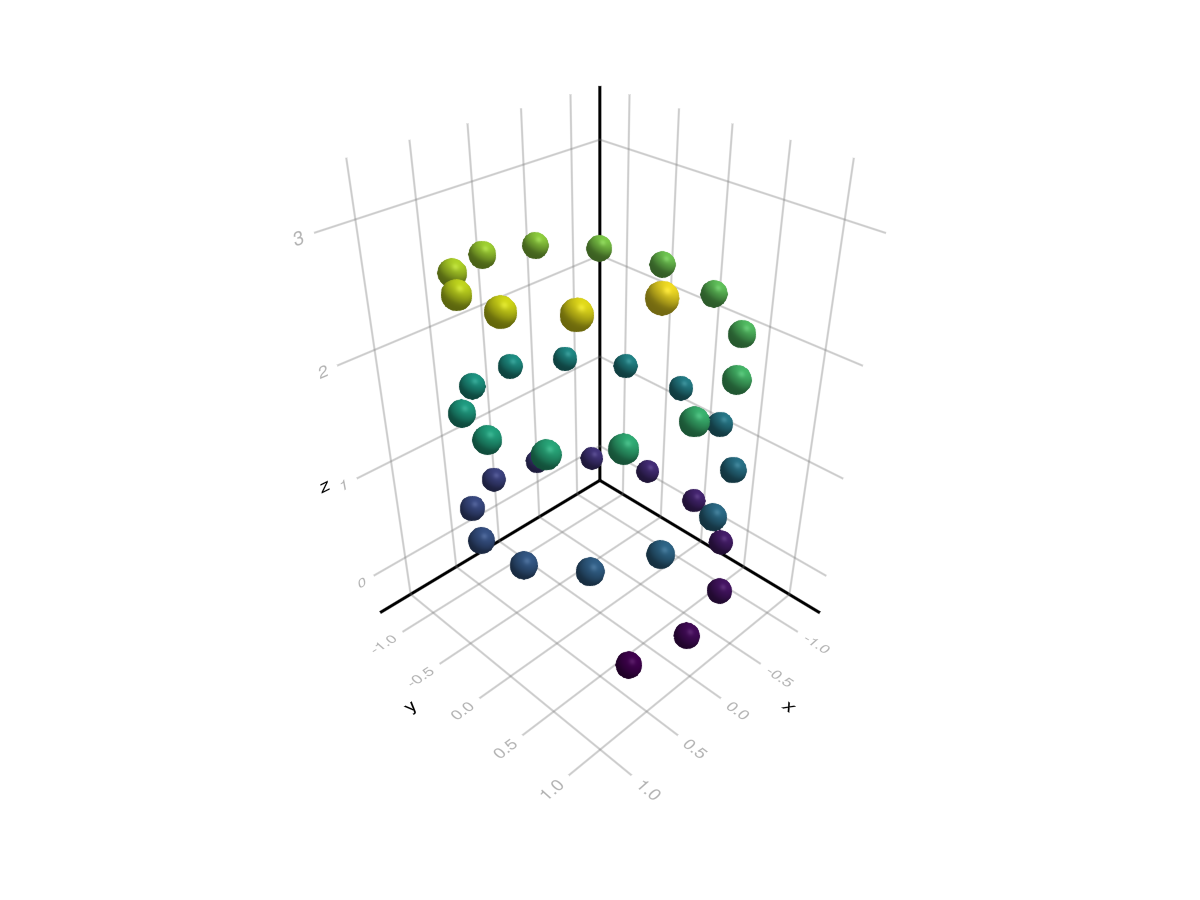
using GLMakie
using FileIO, GeometryBasics
cow = Makie.loadasset("cow.png")

N = 8; M = 10
f = Figure(size = (500, 400))
a, p = meshscatter(
    f[1, 1],
    [Point2f(x, y) for x in 1:M for y in 1:N],
    color = cow,
    uv_transform = [
        # 1. undo y flip of uvs relative to pos
        # 2. grab relevant section from image
        # 3. rotate to match view
        (:rotl90, (Vec2f(x, y), Vec2f(1/M, 1/N)), :flip_y)
        for x in range(0, 1, length = M+1)[1:M]
        for y in range(0, 1, length = N+1)[1:N]
    ],
    markersize = Vec3f(0.9, 0.9, 1),
    marker = uv_normal_mesh(Rect2f(-0.5, -0.5, 1, 1))
)
hidedecorations!(a)
xlims!(a, 0.4, M+0.6)
ylims!(a, 0.4, N+0.6)
f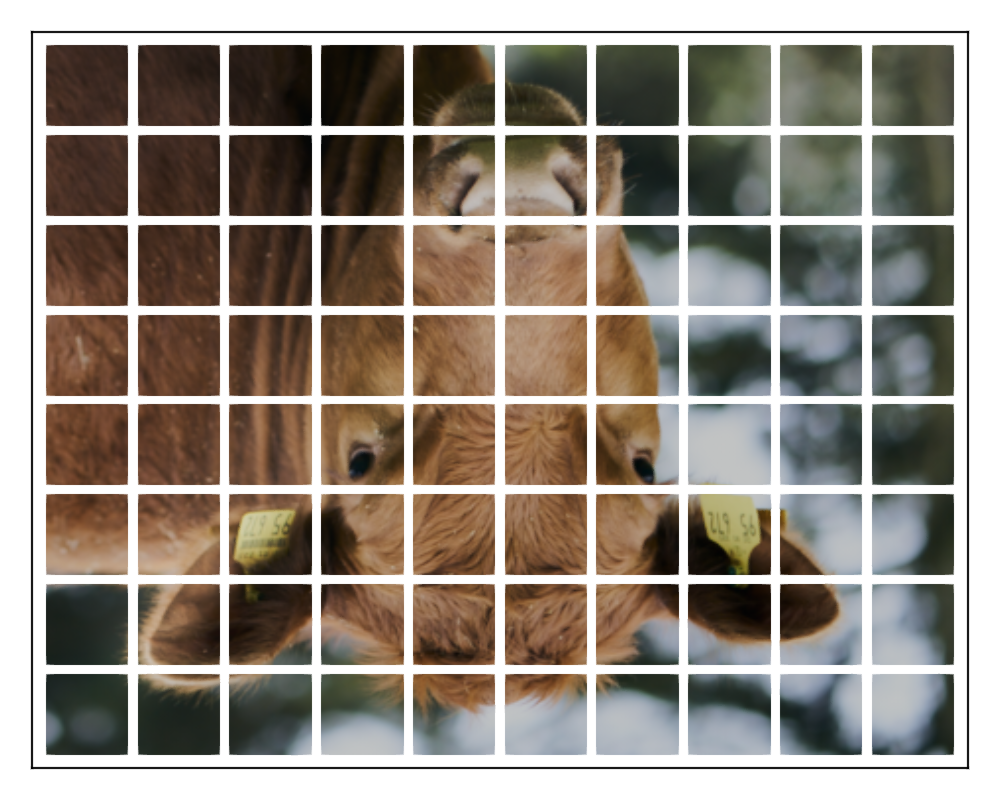
Attributes
alpha
Defaults to 1.0
The alpha value of the colormap or color attribute. Multiple alphas like in plot(alpha=0.2, color=(:red, 0.5)), will get multiplied.
backlight
Defaults to 0.0
Sets a weight for secondary light calculation with inverted normals.
clip_planes
Defaults to @inherit clip_planes automatic
Clip planes offer a way to do clipping in 3D space. You can set a Vector of up to 8 Plane3f planes here, behind which plots will be clipped (i.e. become invisible). By default clip planes are inherited from the parent plot or scene. You can remove parent clip_planes by passing Plane3f[].
color
Defaults to @inherit markercolor
Sets the color of the marker.
colormap
Defaults to @inherit colormap :viridis
Sets the colormap that is sampled for numeric colors. PlotUtils.cgrad(...), Makie.Reverse(any_colormap) can be used as well, or any symbol from ColorBrewer or PlotUtils. To see all available color gradients, you can call Makie.available_gradients().
colorrange
Defaults to automatic
The values representing the start and end points of colormap.
colorscale
Defaults to identity
The color transform function. Can be any function, but only works well together with Colorbar for identity, log, log2, log10, sqrt, logit, Makie.pseudolog10, Makie.Symlog10, Makie.AsinhScale, Makie.SinhScale, Makie.LogScale, Makie.LuptonAsinhScale, and Makie.PowerScale.
cycle
Defaults to [:color]
Sets which attributes to cycle when creating multiple plots. The values to cycle through are defined by the parent Theme. Multiple cycled attributes can be set by passing a vector. Elements can
directly refer to a cycled attribute, e.g.
:colormap a cycled attribute to a palette attribute, e.g.
:linecolor => :colormap multiple cycled attributes to a palette attribute, e.g.
[:linecolor, :markercolor] => :color
depth_shift
Defaults to 0.0
Adjusts the depth value of a plot after all other transformations, i.e. in clip space, where -1 <= depth <= 1. This only applies to GLMakie and WGLMakie and can be used to adjust render order (like a tunable overdraw).
diffuse
Defaults to 1.0
Sets how strongly the red, green and blue channel react to diffuse (scattered) light.
fxaa
Defaults to true
Adjusts whether the plot is rendered with fxaa (fast approximate anti-aliasing, GLMakie only). Note that some plots implement a better native anti-aliasing solution (scatter, text, lines). For them fxaa = true generally lowers quality. Plots that show smoothly interpolated data (e.g. image, surface) may also degrade in quality as fxaa = true can cause blurring.
highclip
Defaults to automatic
The color for any value above the colorrange.
inspectable
Defaults to @inherit inspectable
Sets whether this plot should be seen by DataInspector. The default depends on the theme of the parent scene.
inspector_clear
Defaults to automatic
Sets a callback function (inspector, plot) -> ... for cleaning up custom indicators in DataInspector.
inspector_hover
Defaults to automatic
Sets a callback function (inspector, plot, index) -> ... which replaces the default show_data methods.
inspector_label
Defaults to automatic
Sets a callback function (plot, index, position) -> string which replaces the default label generated by DataInspector.
interpolate
Defaults to true
When using textures as colors, controls whether the texture is sampled with linear interpolation (true) or nearest interpolation (false). (This requires the scattered mesh to include uv coordinates.)
lowclip
Defaults to automatic
The color for any value below the colorrange.
marker
Defaults to :Sphere
Sets the scattered mesh.
markersize
Defaults to 0.1
Sets the scale of the mesh. This can be given as a Vector to apply to each scattered mesh individually.
matcap
Defaults to nothing
No docs available.
material
Defaults to nothing
RPRMakie only attribute to set complex RadeonProRender materials. Warning, how to set an RPR material may change and other backends will ignore this attribute
model
Defaults to automatic
Sets a model matrix for the plot. This overrides adjustments made with translate!, rotate! and scale!.
nan_color
Defaults to :transparent
The color for NaN values.
overdraw
Defaults to false
Controls if the plot will draw over other plots. This specifically means ignoring depth checks in GL backends
rasterize
Defaults to @inherit rasterize false
Controls whether CairoMakie rasterizes a plot (true, >0) or not (false, 0). If an integer is given, it sets the pixel density for rasterization.
rotation
Defaults to 0.0
Sets the rotation of the mesh. A numeric rotation is around the z-axis, a Vec3f causes the mesh to rotate such that the the z-axis is now that vector, and a quaternion describes a general rotation. This can be given as a Vector to apply to each scattered mesh individually.
shading
Defaults to true
Controls if the plot object is shaded by the parent scenes lights or not. The lighting algorithm used is controlled by the scenes shading attribute.
shininess
Defaults to 32.0
Sets how sharp the reflection is.
space
Defaults to :data
Sets the transformation space for box encompassing the plot. See Makie.spaces() for possible inputs.
specular
Defaults to 0.2
Sets how strongly the object reflects light in the red, green and blue channels.
ssao
Defaults to false
Adjusts whether the plot is rendered with ssao (screen space ambient occlusion). Note that this only makes sense in 3D plots and is only applicable with fxaa = true.
transform_marker
Defaults to true
Controls whether the (complete) model matrix applies to the scattered mesh, rather than just the positions. (If this is false, scale!, rotate! and translate!() will not affect the scattered mesh.)
transformation
Defaults to :automatic
Controls the inheritance or directly sets the transformations of a plot. Transformations include the transform function and model matrix as generated by translate!(...), scale!(...) and rotate!(...). They can be set directly by passing a Transformation() object or inherited from the parent plot or scene. Inheritance options include:
:automatic: Inherit transformations if the parent and childspaceis compatible:inherit: Inherit transformations:inherit_model: Inherit only model transformations:inherit_transform_func: Inherit only the transform function:nothing: Inherit neither, fully disconnecting the child's transformations from the parent
Another option is to pass arguments to the transform!() function which then get applied to the plot. For example transformation = (:xz, 1.0) which rotates the xy plane to the xz plane and translates by 1.0. For this inheritance defaults to :automatic but can also be set through e.g. (:nothing, (:xz, 1.0)).
transparency
Defaults to false
Adjusts how the plot deals with transparency. In GLMakie transparency = true results in using Order Independent Transparency.
uv_transform
Defaults to automatic
Sets a transform for uv coordinates, which controls how a texture is mapped to the scattered mesh. Note that the mesh needs to include uv coordinates for this, which is not the case by default for geometry primitives. You can use GeometryBasics.uv_normal_mesh(prim) with, for example prim = Rect2f(0, 0, 1, 1). The attribute can be I, scale::VecTypes{2}, (translation::VecTypes{2}, scale::VecTypes{2}), any of :rotr90, :rotl90, :rot180, :swap_xy/:transpose, :flip_x, :flip_y, :flip_xy, or most generally a Makie.Mat{2, 3, Float32} or Makie.Mat3f as returned by Makie.uv_transform(). It can also be set per scattered mesh by passing a Vector of any of the above and operations can be changed by passing a tuple (op3, op2, op1).
visible
Defaults to true
Controls whether the plot gets rendered or not.